


Architecture#
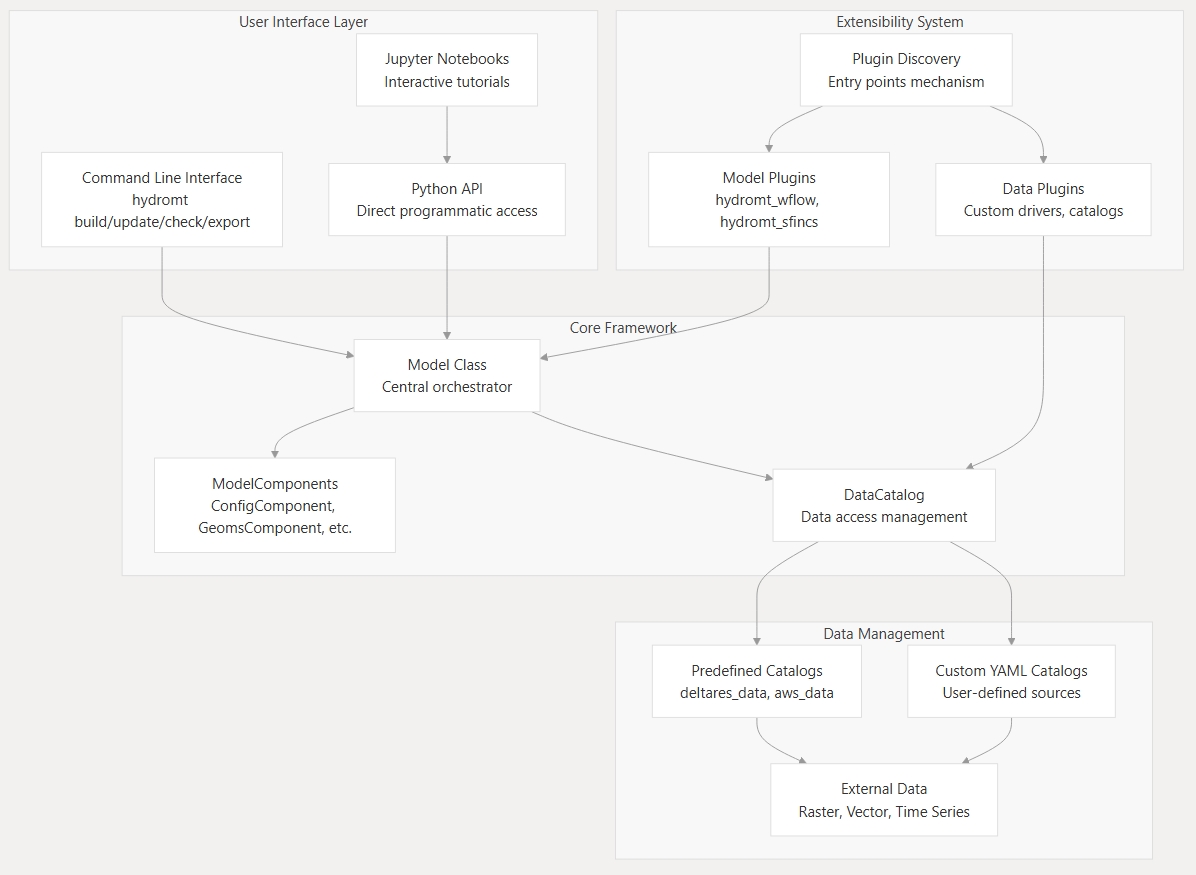
HydroMT provides a modular and extensible framework for building and managing environmental and hydrological models. Its architecture is organized around a few core abstractions that define how models, data, and workflows interact.
At its core, HydroMT connects model components and data sources through a consistent API. This allows flexible model construction, reproducibility, and interoperability across a wide range of models and data systems.
The diagram below summarizes the relationships between these components.
Model#
The Model represents the complete model setup and workflow.
It defines the model domain, manages all ModelComponent’s, and coordinates data loading and transformations through the DataCatalog.
Models can be created interactively, through Python scripts, or from workflow definitions for full reproducibility.
See also:
ModelComponent#
A ModelComponent represents a modular building block of a model, such as a specific model file or model data (for example, static or forcing data).
Each component defines how its data are read and written, and can interact with other components during setup.
Components make models composable, flexible, and easy to extend without modifying the HydroMT core. The below components are included in HydroMT by default but you can also create your own custom components.
Model Component |
Description |
|---|---|
Component for managing model configuration |
|
Component for managing 1D vector data |
|
Component for managing non-geospatial data |
|
Component for managing non-geospatial data |
|
Component for managing geospatial data |
|
Component for managing regular gridded data |
|
Component for managing unstructured grids |
|
Component for managing geospatial vector data |
See also:
DataCatalog#
The DataCatalog is HydroMT’s core data access and management layer.
It provides a structured way to describe where datasets are located, how they can be accessed, and how they should be represented once loaded into memory.
Within the HydroMT architecture, the DataCatalog connects the Model and its components to both internal and external data sources.
It achieves this by maintaining a registry of DataSource objects, each of which encapsulates the specific logic for accessing that specific dataset.
It does not load or process data itself; instead, it delegates those responsibilities to DataSource objects.
The DataCatalog comes with built-in support for several data catalogs:
Predefined catalogs - distributed with HydroMT or plugins (e.g.,
deltares_data,aws_data) that provide standardized and ready-to-use datasets.Custom YAML catalogs - defined by users to reference their own data sources and file structures.
The DataCatalog can be used through the Model class but also standalone in your own Python scripts for data access and processing outside of a model context.
See also:
DataSource#
Each entry in the DataCatalog is represented by a DataSource.
A DataSource encapsulates all the logic required to retrieve and standardize a specific dataset, based on the catalog’s attributes and metadata.
This abstraction separates data definition (in the catalog) from data access and transformation (in the source).
When a model requests data by one of the DataCatalog’s API functions (e.g. get_rasterdataset(), get_geodataframe() etc.),
the DataCatalog looks up the matching DataSource and - along with some pre-processing of function parameters - calls its read_data() method.
From there, the DataSource handles the complete workflow:
Resolve URIs - Using a
URIResolver, it determines the actual file paths or URLs for the requested data. This supports flexible backends, such as local directories, cloud storage, or web APIs.Load data - The resolved URIs are passed to a
Driver, which reads the raw data into a Python object like anxarray.Datasetorgeopandas.GeoDataFrame.Transform and standardize - The loaded data are passed through a
DataAdapter, which applies consistent transformations (e.g., variable renaming, temporal/spatial slicing, or unit conversion) to produce a uniform HydroMT representation.
This layered design allows the DataCatalog to stay lightweight and declarative — it only stores attributes and metadata (e.g., names, paths, data types, parameters), while the DataSource performs the operational work needed to translate those definitions into usable model inputs.
See also:
URIResolver#
The URIResolver locates data by resolving catalog references (URIs) into actual file paths or service endpoints.
It takes query parameters such as spatial bounds or time ranges and returns one or more resolved URIs that can be read by a Driver.
Custom resolvers can be added to support specific naming conventions, APIs, or cloud storage systems.
See also:
Driver#
The Driver reads resolved data into memory as Python objects such as xarray.Dataset or geopandas.GeoDataFrame.
Each HydroMT data type (e.g., raster, vector) has a dedicated driver interface.
Drivers handle the complexity of I/O operations, including merging multiple files and managing filesystem access through fsspec. New drivers can be added through HydroMT’s plugin system to support custom formats.
Existing drivers in HydroMT core include:
Driver |
Data type |
File formats |
|---|---|---|
RasterDataset |
GeoTIFF, ArcASCII, VRT, tile index, etc. |
|
RasterDataset |
NetCDF and Zarr |
|
GeoDataFrame |
ESRI Shapefile, GeoPackage, GeoJSON, etc. |
|
GeoDataFrame |
CSV, XY, PARQUET and EXCEL |
|
GeoDataset |
Vector location (e.g. CSV or GeoJSON) & text delimited time-series (e.g. CSV). |
|
GeoDataset |
NetCDF and Zarr |
|
Dataset |
NetCDF and Zarr |
|
DataFrame |
Any file readable by pandas (CSV, EXCEL, PARQUET, etc.) |
See also:
DataAdapter#
The DataAdapter standardizes and transforms data after it has been read by a Driver.
It performs operations such as variable selection, temporal/spatial slicing, renaming, or unit conversion
to ensure consistency across datasets and models. Note that in some cases, some of these steps may also be
performed in the Driver itself if the underlying xarray, pandas, or geopandas library supports it
directly in their read function.
Each data type (raster, vector, etc.) has its own adapter interface responsible for transforming data into HydroMT’s standardized representation.
See also:
Extensibility#
HydroMT’s architecture is fully extensible. Developers can subclass models, components, drivers, adapters, or resolvers and register them through the plugin system. This is only required if you want to use/support your custom classes through the HydroMT data catalog or model configuration yml files. If you are using your custom classes directly in Python code, you can simply instantiate and use them without registering as a plugin. This flexibility allows HydroMT to support new model types, data formats, and workflows without changing the core library.
See also: